














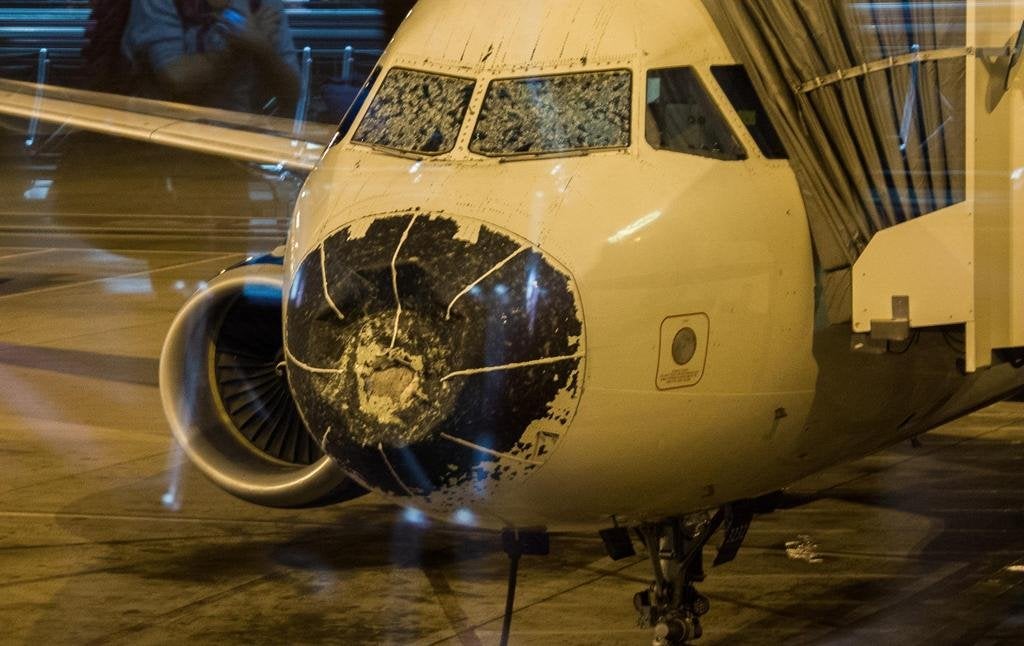
Officials are crediting teamwork between air traffic controllers and the pilots of a Delta Air Lines A320 with a successful outcome after the severely hail-damaged aircraft made an emergency landing at Denver International Airport on Friday. The aircraft was on a flight from Boston to Salt Lake City when it went flew through an area of hail in northeastern Colorado. Hail damaged the pilot’s and first officer’s windscreens and also deformed and punctured the radome. Without any forward visibility, the pilots selected an autoland and the aircraft was recovered without further incident. It was able to taxi to a gate where passengers tweeted photos of the damaged aircraft.
According to FlightAware, the aircraft appears to have diverted south of a major line of violent thunderstorms in northeastern Colorado but the hail apparently extended to the south of that line. Passengers reported severe turbulence and could hear the hailstones hitting the outside of the aircraft. In the Twitter photos, the radome is pushed in and breached at the apex of the nose. The wings and engines don’t show any visible damage.