














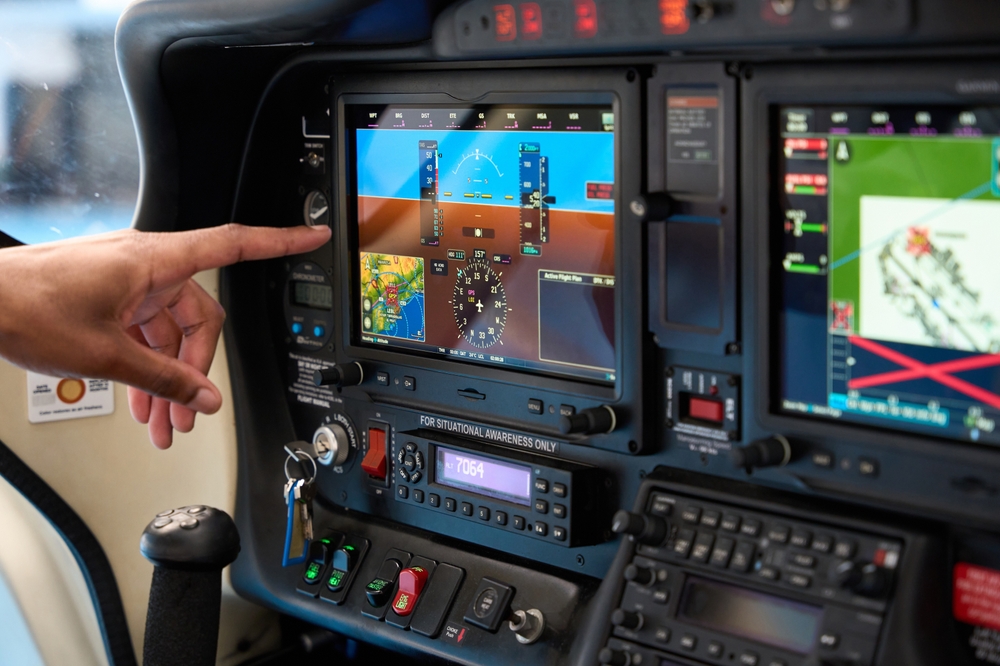

The FAA is accepting comments through Sept. 24 on proposed guidance for certifying cockpit controls that include touchscreens, speech recognition and other software-based interfaces. Draft Advisory Circular 20-175A would replace guidance issued in 2011 and applies to aircraft certified under Parts 23, 25, 27 and 29.
The FAA’s underlying approach is largely unchanged from the 2011 guidance, which already addressed issues such as touchscreen usability, hand stabilization and access to frequently used functions. The proposed revision mainly adds more detailed guidance for multi-touch gestures, speech recognition, multimodal controls and newer aircraft configurations such as powered-lift designs.
Voice Commands Get Expanded Guidance
The revision substantially expands the FAA’s treatment of speech recognition, which can allow pilots to control avionics through spoken commands. The agency notes that speech controls could reduce head-down time when a pilot’s hands and eyes are occupied, but recognition can be affected by accents, voice characteristics, stress, fatigue, physical exertion and cockpit noise.
The FAA distinguishes between recognizing spoken words and successfully carrying out a command. As an example, the agency says a system could correctly recognize 93% of spoken words while successfully executing only 65% of commands, illustrating why it considers command-success rate the more useful measure of cockpit usability.
The draft does not establish a specific minimum command-success percentage, but says systems with low success rates should be limited to less-critical functions.
Under the proposed guidance, pilots should have a manual method of controlling functions available when speech recognition is used, and manual controls should take precedence over spoken commands. Speech would not be accepted as the sole means of control. The draft also adds guidance for multimodal interfaces that combine touchscreens, cursor devices and speech recognition, along with a new chapter addressing cockpit controls in emerging aircraft such as powered-lift and eVTOL designs.
Touchscreens Under Turbulence
For touchscreen systems, the FAA says manufacturers should demonstrate acceptable workload, error rates and task-completion times. The guidance calls for support that allows pilots to stabilize their hands while making selections and asks designers to consider turbulence and vibration when developing touchscreen gestures. The FAA recommends limiting gestures to one or two fingers when possible and avoiding gestures that require wrist rotation or more than two fingers.
The draft also addresses the effects of routine cockpit use on touchscreens. Systems should continue operating properly after exposure to skin oils, perspiration, sunlight, cleaners and liquids such as coffee or tea. The FAA also calls for consideration of scratching, hazing and calibration drift. Frequently used and emergency functions should remain readily accessible instead of requiring pilots to navigate through multiple layers of menus.
In practice, the revised guidance would give the FAA more specific criteria for evaluating new cockpit interfaces during certification, including touchscreen usability in turbulence, access to critical functions and manual override of voice commands. It could directly shape how future avionics are designed, tested and approved. The guidance would not require changes to already approved or installed avionics.

After using touchscreens in simulators a lot, there should be a requirement that all critical controls have physical knobs/swtiches/levers as approriate in addition or in lieu of touchscreen control. There should also be a requirement for minimum touchscreen control size.
While not an aircraft, full flight simulators simulate turbulence and the like very well.
I would like to see any touchscreen, FAA certified, demonstrated by a flight crewmember in moderate turbulence in the clouds. In the crew environment, the nonflying pilot would have their hands full. I can’t imagine how that would work as a single pilot flying in the clouds without a working autopilot!
In an industry meeting of RTCA type, I held up my hand in a seemingly interminable debate over number of button pushes that were acceptable to get to the display of a function. (One maker of navigation system had too few buttons, though hierarchy of how they reached modes was often a question for systems like FMS.)
‘Think broadly’ I said, we (my employer) have an interface option using a joystick. It is intended to mark target on radar display so aircraft can orbit around it.
That gives easy readout of position to radio to rescuers, and facilitates dropping supplies from own aircraft,
The interface is great for such purpose, but not for many others.
(Our joystick mode was pilot selectable through our navigator, cursor on flight display of radar image.)